
STEP 01
Probe
Automated checks crawl each operator's real front-end on a schedule you set - no manual screenshotting. Probes run in a real browser and see the same lobby a player would, so the position recorded is the one that matters.
Read moreBusiness intelligence for placement contracts
Pecker tracks where your slots and casino games sit on every operator's site, correlates position with revenue, and hands account managers evidence instead of a hunch.
How it works
Automated checks crawl each operator's real front-end on a schedule you set - no manual screenshotting. Probes run in a real browser and see the same lobby a player would, so the position recorded is the one that matters.
Read moreEvery position change is recorded and timestamped, so drift and volatility become a chart, not a hunch. You see trends building over days and weeks, not a snapshot that's already stale.
Read moreEvidence-ready reports for your account managers - built to back a renegotiation, not just satisfy curiosity. Filter by operator, game, or date range and export what you need for the conversation.
Read moreBuilt for the business question
See how a slot's daily position tracks against the revenue it drives, per operator. When a game slides off the front page, the revenue impact shows on the same chart — not in a separate spreadsheet weeks later. Placement disputes become about what a position is worth, not where you think it should be.
See how the correlation works →Position changes are flagged the moment they're recorded, so you're negotiating on this week's placement, not last quarter's. Most breaches don't start with a dramatic drop — they start with a quiet slide of a few spots, easy to miss if you're checking manually once a month. Pecker catches drift while it's still small enough to resolve with a phone call.
How drift alerts work →Best position slipped 25 places over 2 days.
Each probe captures the page as it looked at scan time, so a disputed position comes with a picture attached, not just a number. There's no ambiguity about what visitors actually saw, no back-and-forth about lobby sort order, and no need to take anyone's word for it. It makes a compliance conversation straightforward to start — and difficult to contest.
See a captured screenshot up close →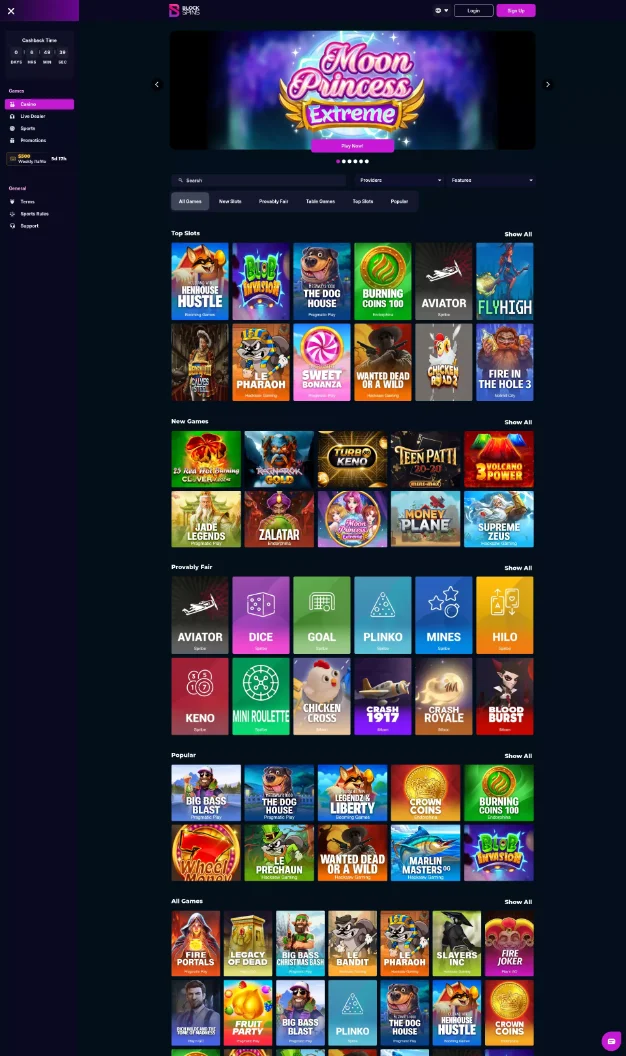
Every probe result is timestamped and retained — not as a daily summary, but as individual checks you can trace to a specific scan. Export a position history for any game, any operator, any date range. Hand your account manager a report that shows exactly what happened and for how long — the kind of evidence that moves a renegotiation forward.
See what an export looks like →| Date | Game | Best position |
|---|---|---|
| 2026-07-28 | Golden Reels | 2 |
| 2026-07-29 | Golden Reels | 2 |
| 2026-07-30 | Golden Reels | 5 |
| 2026-07-31 | Golden Reels | 18 |
| 2026-08-01 | Golden Reels | 23 |
The platform
Agents in different countries scan each operator's site the way a visitor there sees it, so a position is recorded for the market that matters.
Config finder loads the page, finds the grid of game tiles and suggests the settings, so nobody hand-writes selectors.
Position, drift, volatility and scans for any date range, ready to hand over.
Telegram alerts when a probe fails or an agent becomes unreachable.
Runs in Docker on your own infrastructure, or we run it for you. Either way the data stays yours.
The dashboard
Application admins get the full operator and probe console. Account managers and similar roles get a focused reports view built around the questions they actually ask. Deploy it on your own infrastructure or let us run it for you — either way, the data never leaves your control.
1.6 GB used - 3,600 objects
| Operator | Probe | Status | Last scan | |
|---|---|---|---|---|
| Operator D | Slots Lobby | Cloudflare | 2h ago | |
| Operator F | Live Casino Lobby | Overdue | 39h ago |
Built for content providers who manage placement contracts across dozens of operators, Pecker replaces the manual spot-checks, shared spreadsheets, and screenshot folders that slow account teams down. Set it up once, and compliance monitoring runs quietly in the background.
Your time goes to the conversations that matter, not the screenshotting that precedes them. And when something does slip, you'll know about it before your next call — not after.